Discover how an essential PO system can streamline operations for small businesses, enhancing efficiency and control. Read more to transform your processes.

Managing purchase orders manually can slow down operations and lead to costly mistakes. For small businesses juggling procurement and outbound logistics, the right PO system can bring clarity and control. Whether you’re sending purchase orders to suppliers or receiving them from retail partners, a purchase order management system simplifies your workflows and improves order accuracy.
In this guide, we’ll break down the two main uses of a PO system: purchasing (cutting POs to vendors) and outbound order management (receiving POs from customers). We’ll also explore the key features of good purchasing software, the benefits of automation, and how purchase order systems work in practice.
How Purchase Order Systems Work

Manual tracking are time-consuming, harder to track, and more prone to errors. Without a proper system, small businesses face bottlenecks and delayed approvals, which can hinder growth and efficiency.
Purchase order systems provide a structured and automated process for managing the full lifecycle of a PO. Whether you're creating purchase orders or tracking those you’ve received, the goal is complete visibility and fewer manual errors.
Here’s how a typical procurement cycle looks:
A team member submits a purchase request.
The request moves through an approval process.
The system generates a PO with all necessary contact details, product info, and vendor terms.
The PO is sent to a reliable vendor via email or vendor portal.
When goods arrive, the system updates inventory levels and notifies relevant business areas.
Invoice reconciliation happens through invoice matching.
Payment is processed once the invoice is approved.
In an outbound model:
A customer sends you a PO.
You log the PO and verify order requests.
The system creates a pick list and shipping documents.
As goods are fulfilled, you update order status and track spending.
You generate an invoice based on shipped quantities.
This automated process reduces the learning curve for new hires, saves time, and improves collaboration between procurement, fulfillment, and finance teams.
Key Features to Look For

When evaluating a PO system, here are the core features and desired capabilities to look for:
Automated workflows: Streamline purchase approvals, data entry and fulfillment steps.
Integration capabilities: Look for accounting integrations and compatibility with your existing workflows.
Invoice matching and automation: Avoid paying for items not received and reduce manual work
Customizable purchase orders: Use templates that match your business style and vendor needs.
Supplier management: Evaluate supplier performance, manage payment terms, and qualify reliable vendors.
Seamless integration with inventory and shipping tools: Ensure accurate inventory updates and efficient outbound fulfillment.
Whether you want to focus on procurement management or outbound sales, choosing a system with these capabilities ensures better visibility, user experience and cost savings.
Benefits of Automating Your Purchase Order Process
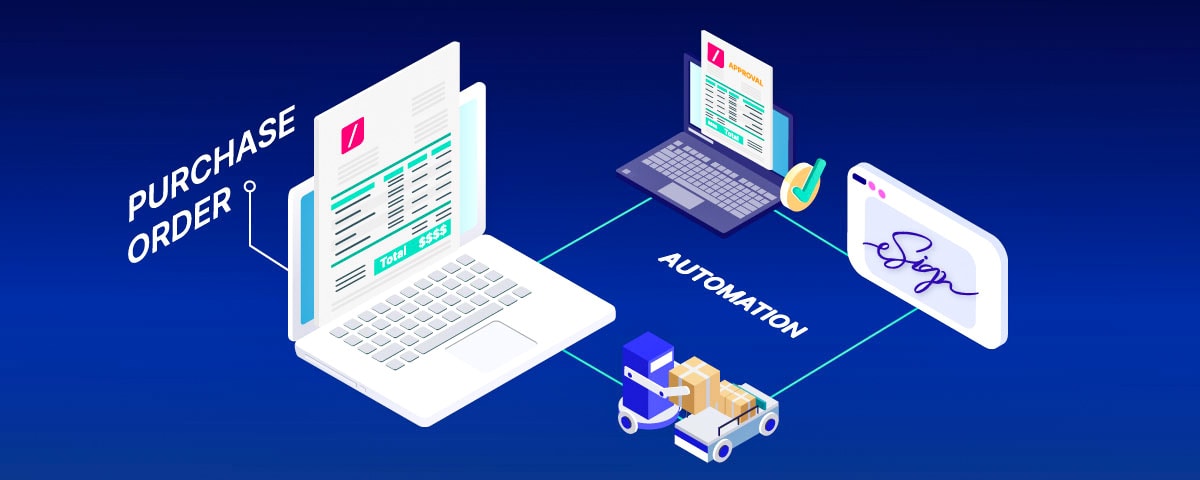
Implementing a purchase order system provides value across multiple business processes. Here are some of the benefits:
Save Time
Automated workflows reduce back-and-forth emails, manual data entry, and invoice disputes. You create purchase orders faster and reduce fulfillment delays.
Reduce Human Error
With structured templates and automated validation, po software eliminates mistakes that come from inconsistent data entry.
Strengthen Supplier or Customer Relationships
Using a PO system signals professionalism. Parnters appreciate clear order details, on-time payments/fulfillment and consistent communication.
Get Complete Visibility
From initial request to final payment, a robust system provides complete visibility into your procurement cycle or sales fulfillment process.
Do You Need a Full Procurement + Sales System?
Not always. It depends on your specific business. Some businesses only need purchasing software to manage approved purchase requests and vendor contracts. Others need a sales-focused PO system that handles incoming customer orders.
Buddy, for example, focuses solely on outbound logistics. If your business is built around fulfilling POs from customers, Buddy provides a lightweight, focused solution without the bulk of a full procurement suite.
For small teams, this focused approach often saves time and improves accuracy faster than trying to manage both sides in one system.
Common Challenges and Solutions

Adopting a new purchase order system can come with its set of challenges. Small businesses should assess their pricing structures. This includes considering any hidden costs involved. Defining the necessary information to create purchase orders helps streamline the approval workflow and can reduce future bottlenecks.
Training employees on the new purchase order system ensures they feel competent and confident using the new tools effectively. Structured approval workflows streamline the approval process and reduce resistance to changes caused by unfamiliar practices.
Open communication and support from leadership can help mitigate challenges like anxiety over the new system.
Summary
A PO system is a critical part of running efficient operations. Whether you're sending or receiving purchase orders, having a structured process improves accuracy, reduces manual work, and creates stronger vendor relationships.
By investing in the right PO system, you gain better control over company spending, improve supplier management, and build a foundation for scalable, reliable operations.
Need help figuring out if Buddy is the right fit? We can help you compare your workflow to our core features and show how to plug it into your existing tech stack.
Frequently Asked Questions
1. What is the best PO system for small business in 2025?
The best PO system for small businesses in 2025 depends on your operations. If you manage inbound procurement, look for purchase order software that supports approval workflows, vendor management, and invoice matching. If your focus is outbound logistics, Buddy is a leading option. It helps small businesses receive and fulfill customer purchase orders efficiently, with tools to track orders, update inventory, and reduce manual errors.
2. How does a purchase order system improve the purchasing process?
A purchase order system streamlines the purchasing process by automating purchase requests, approvals, and PO generation. It ensures all purchase orders include accurate order details, payment terms, and contact details. This structured approach improves supplier management, reduces human error, and gives finance teams better control over expense management and cash flow.
3. Can a small business use a PO system for both procurement and sales?
Yes, some purchase order systems support both procurement and outbound sales, while others specialize. If your business cuts POs to vendors and also fulfills POs from customers, you may need a full-featured purchase order management system. However, if you only manage outbound fulfillment, a focused solution like Buddy can be more efficient and easier to implement.
4. What key features should I look for in PO software for small businesses?
Key features to look for in PO software include automated workflows, customizable purchase order templates, integration with accounting software, invoice matching, and real-time spend tracking. Seamless integration with inventory management and shipping tools is also critical for businesses that manage outbound logistics or ecommerce fulfillment.
5. How does automating the PO process help save time and reduce errors?
Automating the PO process reduces time spent on manual entry, back-and-forth approvals, and invoice reconciliation. It ensures consistent data formatting, accurate tracking, and timely invoice payments. Automation also cuts down on manual errors, helps maintain reliable vendor relationships, and provides complete visibility into your procurement or sales fulfillment cycle.